Venice.ai — Uncensored AI with Privacy and E2EE Encryption
The vast majority of us already use AI today. And those who don't yet will in the future. Just like when the internet arrived and many said it was irrelevant to their lives, yet today they can't imagine life without it. Those of you who already use an AI chatbot probably get it for free and might wonder why Venice.ai, when it's a paid platform. The answer is one word: "privacy".
The Venice.ai platform doesn't store chats on its servers. They're stored only locally in your browser. Even with a court order, they can't be released because they simply aren't stored on servers and employees have no access to them. Venice.ai acts as an intermediary (proxy) between you and the AI model. No logs or IP addresses are stored either. Your data isn't used to train models. Unlike ChatGPT, which stores your data and uses it to improve its models, Venice.ai rejects this approach.
Uncensored AI
It's important to distinguish two things: privacy and censorship.
Privacy Venice.ai guarantees for all models – neither Venice nor your ISP can see what you're asking. This applies to ChatGPT, Claude, and Grok as well.
Censorship is a property of the model itself, not the platform. When you ask ChatGPT through Venice something that OpenAI prohibits, the model will refuse to answer exactly the same way it would on chatgpt.com. Venice.ai cannot change the system instructions and guardrails built into the model.
What Venice.ai offers are open-source models without guardrails – for example DeepSeek, Llama, Mistral, or GLM. These models aren't restricted by corporate content policies and Venice.ai doesn't add its own filters to them. With these models, you get truly uncensored responses. If you're looking for AI without censorship, Venice.ai is currently the best alternative on the market.
| Model | Privacy via Venice | Censorship |
|---|---|---|
| ChatGPT | Yes | Yes (OpenAI guardrails) |
| Claude | Yes | Yes (Anthropic guardrails) |
| Grok | Yes | Yes (xAI guardrails) |
| DeepSeek | Yes | No (open-source, no guardrails) |
| GLM | Yes | No (open-source, no guardrails) |
| Llama | Yes | No (open-source, no guardrails) |
If uncensored AI is important to you, use the open-source models available on Venice.ai. If you need privacy but don't mind censorship, you can also use ChatGPT or Claude.
How You Access the AI Model
- You (browser) → Send prompt (encrypted via HTTPS/TLS)
- Venice Proxy Server → Receives your request, removes your IP address, doesn't log the request content
- Backend AI Server (where GLM, DeepSeek, etc. run) → Processes prompt, generates response
- Venice Proxy Server → Passes response back to you, doesn't store it anywhere on disk
- You (browser) → Response is displayed and stored only locally in your browser
Important limitation
Venice proxy (for Private and Anon models) doesn't have end-to-end encryption (E2EE) like Signal or ProtonMail. The Venice proxy server can technically see the prompt content during processing, but claims it doesn't log it.
Only E2EE TEE models (e.g., GLM) use true end-to-end encryption, where the Venice proxy sees only encrypted text and the content is decrypted only inside the TEE enclave.
| Encryption type | Who can see the content? |
|---|---|
| E2EE (Signal) | Only sender and recipient |
| Venice (TLS proxy) | Venice proxy server can technically see content during processing, but claims it doesn't log it |
Venice proxy must see the prompt content to pass it to the AI model. But unlike ChatGPT, it doesn't store it.
The platform separates identity from content.
ChatGPT:
"User 192.168.1.1 (John Smith) is asking about: [sensitive content]" → Everything is connected on one server
Venice.ai:
Proxy knows: "Someone is asking about [sensitive content]" (no IP, no name)
Backend knows: "I received a request for [sensitive content]" (no IP, no name)
→ Identity and content are separated
Let me also clarify that Venice.ai has 3 types of models based on privacy level:
- E2EE TEE
- Private
- Anon
E2EE TEE Model
The GLM model (specifically GLM 5.2 at the time of writing) runs on Venice.ai with the highest level of privacy protection, combining two advanced technologies: E2EE and TEE. Here's a detailed explanation:
E2EE (End-to-End Encryption)
E2EE means your communication is encrypted on your device (in your browser) and can only be decrypted inside the secure environment where the AI model itself runs.
How it works:
- You write a prompt in your browser.
- The browser generates an encryption key and encrypts your prompt.
- The encrypted prompt travels over the internet to Venice's servers.
- The Venice proxy server sees only incomprehensible encrypted text.
- It cannot read what you wrote.
- The encrypted prompt is passed to the model's isolated environment.
- There it's decrypted, processed, and the response is encrypted and sent back.
Advantage: No intermediary (neither Venice.ai, nor your ISP, nor a hacker eavesdropping on the network) can read your prompt or the model's response.
TEE (Trusted Execution Environment)
TEE is a hardware-isolated area in the server's processor (e.g., Intel SGX or AMD SEV). It works like a "safe inside a computer." Code and data running inside the TEE are protected from everything else on that server – including the server administrator and the operating system.
How it works in the context of the GLM model:
- The GLM AI model is loaded and runs inside a TEE enclave.
- Your E2EE encrypted prompt enters the TEE.
- Inside the TEE, the prompt is decrypted and the model processes it.
- No one outside the TEE (neither Venice.ai nor the cloud server provider) can see the data inside the TEE. Even if someone physically accessed the server and dumped RAM, they'd see only encrypted blobs.
- The response is encrypted inside the TEE and sent back.
Combining TEE + E2EE for GLM on Venice.ai
When you combine these two technologies, you get what's called "Confidential AI."
Why is this crucial?
Zero-Knowledge Architecture: Venice.ai literally doesn't know what you're talking about with the GLM model. They can't report you, they can't censor you based on content (because they can't see the content), and they can't sell your data.
Protection against court orders: Even if Venice.ai received a court order to release a specific user's communications, they can only hand over encrypted text that can't be decrypted without the key in your browser.
Protection against data breaches: Even if a hacker breached Venice's servers and stole all data, they'd get only encrypted blobs that are useless.
Private Model
No prompt data is stored in any way – neither by Venice nor by the model provider.
Privacy level: Medium/high. It guarantees that after generating a response, your query is immediately and permanently deleted from server memory. No one keeps it.
Anon (Anonymized) Model
The model provider may retain the text of your prompt, but Venice removes all information about you (IP address, account, metadata) before sending it.
Privacy level: Lowest of the three. Your identity is hidden, but the content of your query may be logged and analyzed by the provider (e.g., the open-source model creator).
Pricing and Models
Venice.ai costs less than ChatGPT Plus and there's also a free version (though it's quite limited in terms of daily queries). Below is a pricing table. More detailed pricing information is available at venice.ai/pricing.
| Tier | Price/month | Price/year | What you get |
|---|---|---|---|
| Free | $0 | $0 | 10 text prompts/day, 15 images/day, base models |
| Pro | $18 | $180 | Unlimited text, 1000 images/day, 100 credits/month |
| Pro Plus | $68 | $680 | Everything in Pro + 7500 credits/month, higher limits |
| Max | $200 | $2,000 | Everything in Plus + 22500 credits/month, highest limits |
With the base plan, you have unlimited access to GLM, DeepSeek, and Google Gemma models. Other models like ChatGPT, Grok, Kimi K2, and Claude are available for credits that you can purchase. You can pay for both credits and monthly or annual subscriptions online by card or with cryptocurrencies.
Credits
Credits are Venice.ai's universal currency for premium features. They're used for video generation, music, access to premium models (like ChatGPT, Claude, or Grok), and API access. Every paid plan includes a monthly credit allotment. Since the conversion is simple – 100 credits = $1 – you always know exactly how much you're spending.
Monthly credit allotment:
- Pro: 100 credits monthly (value $1)
- Pro Plus: 7,500 credits monthly (value $75)
- Max: 22,500 credits monthly (value $225)
Credit banking (rollover to next month)
Pro Plus and Max plans offer credit banking. This means unused credits at the end of the month don't disappear but roll over to the next period. For Pro Plus, credits last up to 2 months; for Max, up to 3 months.
Credit bonus on purchase
Users with higher plans get an advantage when buying additional credits. Pro Plus users get a 10% bonus and Max users get a 12.5% bonus. So if a Max user buys $100 worth of credits, they receive credits worth $112.50.
Welcome credits for new users
All new users get a one-time 500 welcome credits (value $5) upon registration. This allows even free-tier users to try premium features like video generation or advanced models before deciding on a paid subscription.
Venice.ai Tokenomics
Venice.ai has its own tokenomics built on the Base blockchain:
VVV token – Venice.ai's utility token that serves as an access key for AI agents and developers to use the Venice API without paying for each request. Initial supply was 100 million tokens, with inflation of 6 million per year.
DIEM token – staking token that enables passive income. Each staked DIEM gives $1 daily in API or in-app credit. DIEM is a freely tradable token on the Base blockchain. New DIEM can be minted by locking staked VVV (sVVV) at the current mint rate, but DIEM can also be purchased on decentralized exchanges.
Airdrop – Venice.ai conducted the largest airdrop in Base blockchain history. No further airdrops are planned; Season 2 VVV airdrop will not happen.
The token dashboard is available at venice.ai/token.
API for Developers
Venice.ai offers an OpenAI-compatible API. This means developers can replace the ChatGPT API with the Venice API without needing to change code. For privacy-conscious developers, it's an ideal solution – they get the power of OpenAI models without their data ending up on big tech servers.
The API supports the same endpoints as OpenAI, so migration is a matter of changing the base URL and API key. API access is available even in the Free tier.
What Venice.ai Can Do
Venice.ai isn't just an AI chatbot. The platform offers a wide range of features that make it a comprehensive AI tool:
- Text chat – unlimited conversations with GLM, DeepSeek, Google Gemma, and other models
- Image generation – 15 images per day free, 1000 per day in Pro
- Video generation – via Venice Video Studio
- Music generation – create audio content with AI
- Text to speech – convert text to spoken word
- Vision – AI can analyze uploaded images and photos
- Document uploads – PDF and text file support for analysis
- Web search – AI can search the internet and bring current information
- Image upscaling – enlarge and improve image quality
- Background removal – image editing (available for Pro users)
- NSFW content – Venice.ai explicitly supports generating uncensored content including NSFW images (unlike ChatGPT or Claude, which strictly prohibit it)
- Character creation – create and share custom AI characters with unique personalities
- Watermark removal – remove watermarks from generated images
- Generative image editing – advanced editing tools for modifying AI images
- Extended context window – for long conversations and deep analytical work (Pro tier)
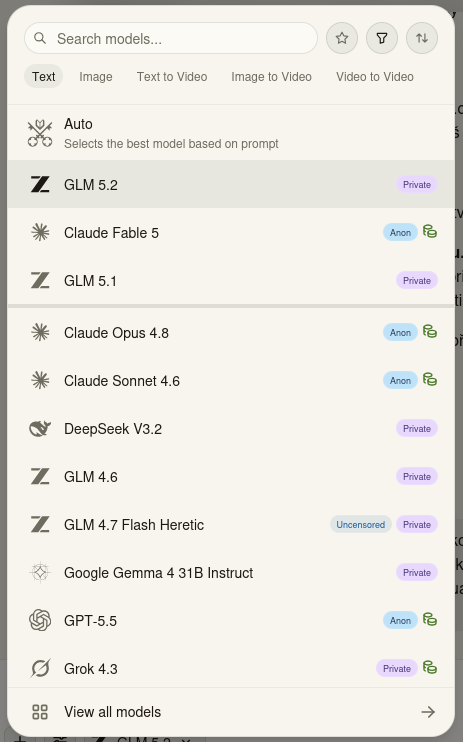
Fig.1: Menu with modes and chatbots
From Figure 1, it's clear that the platform offers modes for working with images and video in addition to text mode.
Agentic Chat
The Venice.ai platform offers Agentic chat in addition to regular chat. What's the difference between Agentic chat and normal chat?
Agentic chat (often referred to as an AI agent) is a chat where artificial intelligence isn't just a passive responder, but an active task solver with autonomy and the ability to use tools. Agentic chat is considered the next big step in AI development. It's no longer just about AI "knowing" things, but about being able to interact with the digital world. Examples include AI assistants in office applications (like Microsoft Copilot) that can search your inbox, analyze data in Excel, and convert it directly to PowerPoint.
System Prompt
A system prompt (sometimes called "System message" or "Custom instructions") is the basic setting or "personality" of the AI that you define before you even start communicating with it.
It's not a question for the AI to answer. It's the permanent rules of the game that the AI must follow for every subsequent message you write.
How it works with AI
When you fill in the system prompt field in Settings, these instructions aren't just saved as a note. The AI takes them and inserts them at the very beginning of every new conversation you start. The image below shows the system prompt menu open.
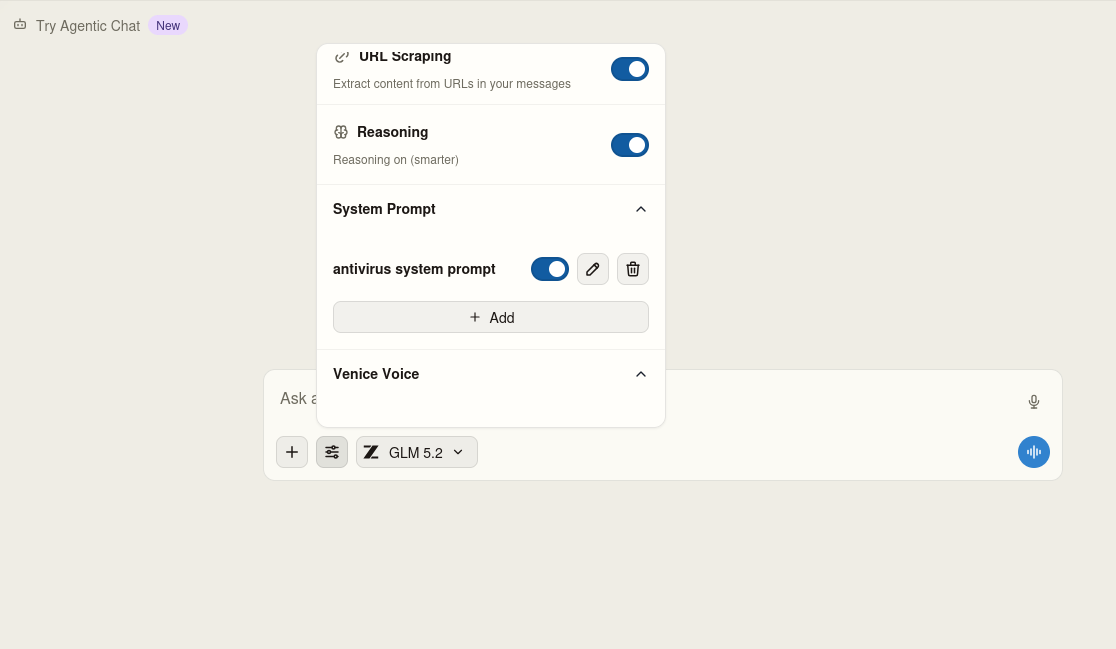
Fig.2: System prompt
Example system prompt:
"Respond in detail and accurately. Focus on facts and correctness of answers. Verify uncertain information when possible. If you can't access certain information, don't make things up and say you can't access it. If the question is unclear, ask for clarification rather than speculating at length."
You set this once in settings and the AI will apply it automatically to everything you ever write. It saves time and ensures the AI responds consistently exactly how you want.
Let me add one important thing. At the beginning of the article, I mentioned that your chat history is stored locally in your web browser. This means that when you log into your account on another device, you won't see your chat history there.
Encrypted chat backup
For Pro tier and above, there's an encrypted chat backup and restore feature. This solves the problem I mentioned above – that chat history is stored only locally on a specific device. With Pro tier, you can back up chats encrypted and restore them on another device without Venice.ai having access to them.
Below is a screenshot of the Venice.ai web interface.
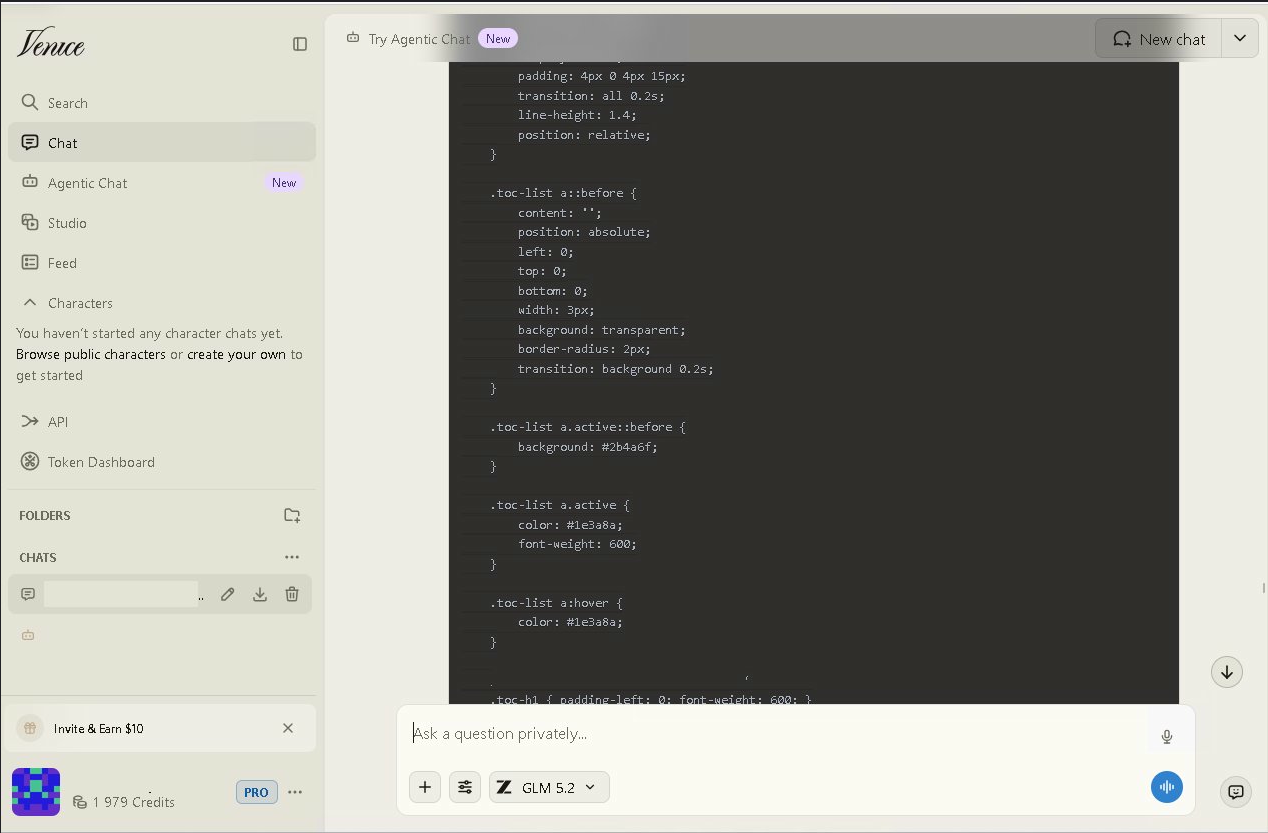
Fig.3: Venice.ai web interface
In Fig.3 you can see what the Venice.ai web interface looks like. You can try it for free at venice.ai – you can ask the chatbot 10 questions per day.
The platform is developing very quickly, so AI is available not only through the web interface but also offers standalone apps. I tested the Android app and must say the response to questions/prompts was much snappier than on PC in the web interface.
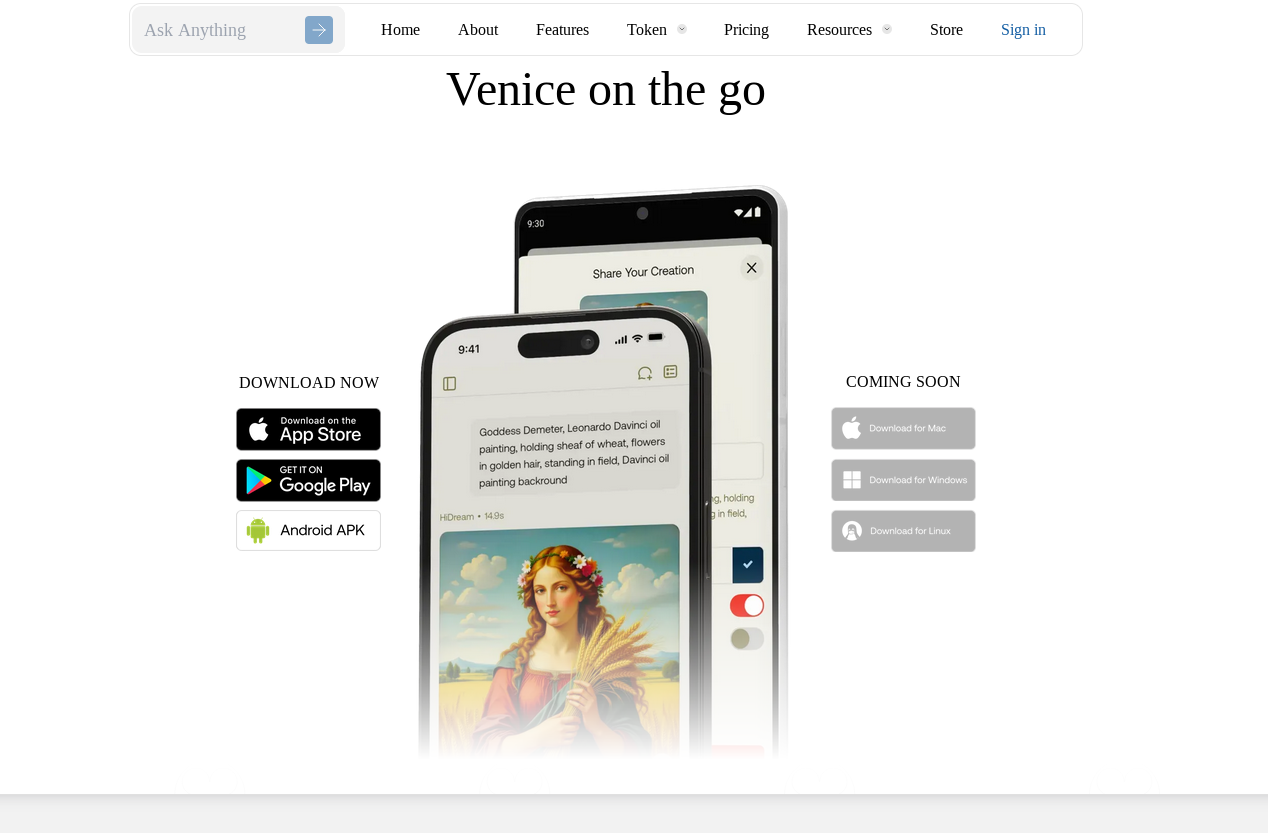
Fig.4: Platforms where you can download the app
Fig.4 shows on which platforms Venice.ai is and will be available in the near future.
Comparison with Competitors
| Platform | Privacy | Censorship | Price/month | Tokenomics |
|---|---|---|---|---|
| ChatGPT | None | Yes | $20 | No |
| Claude | None | Yes | $20 | No |
| Venice.ai | E2EE+TEE | Partial (depends on model) | $18 | Yes (VVV, DIEM) |
| Local Ollama | Maximum | No | Free | No |
As you can see, Venice.ai is the only platform that combines E2EE+TEE level privacy, uncensored models, and its own tokenomics. Local Ollama offers maximum privacy but requires your own hardware and technical knowledge.
If you're interested in how to surf the web without a trace, read my article about the Mullvad browser. And if you want to spend crypto without your bank knowing, check out my review of the ether.fi Cash Card.